
PEB Studio
Smart Erection – on-site erection management

I.3 Smart Erection Navigator & status-coloured BIM Model Viewer

Enter or scan a mark → the camera flies to the location, the component is highlighted in orange and connected components in blue, with grid / elevation / step / container / yard shown. The erection crew knows immediately where the component goes.

What it does

  • BIM coloured by erection status, zone, priority, container or fabrication; X-ray, isolate, hide, sections by elevation / grid, explode, measure and screenshot.
  • Model tree by type, zone, elevation, grid and container; click a component to update its status according to permissions.
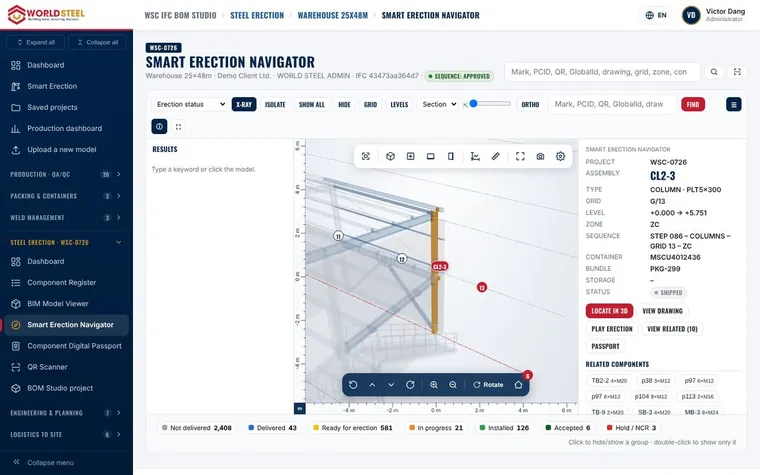
Smart Erection Navigator & status-coloured BIM Model Viewer

Questa pagina ti è stata utile?

Aggiornato il 01 Nov 2026

Serve ancora aiuto?

I nostri specialisti di prodotto rispondono nella vostra lingua, di solito entro 4 ore lavorative.