
-
Step 1
Create the shipment and container
Open Packing & Containers, create a shipment and add a container. Container numbers are validated against the ISO 6346 check digit.
-
Step 2
Add eligible components
Only components that are fabricated, QC-released, painted / galvanised and not on hold can be packed. Each serial can be allocated only once.
-
Step 3
Plan the load
Drag packages onto the plan and elevation views. The planner checks door and roof clearance, payload, centre of gravity and stacking.
Tip Packages needed first on site are suggested near the door.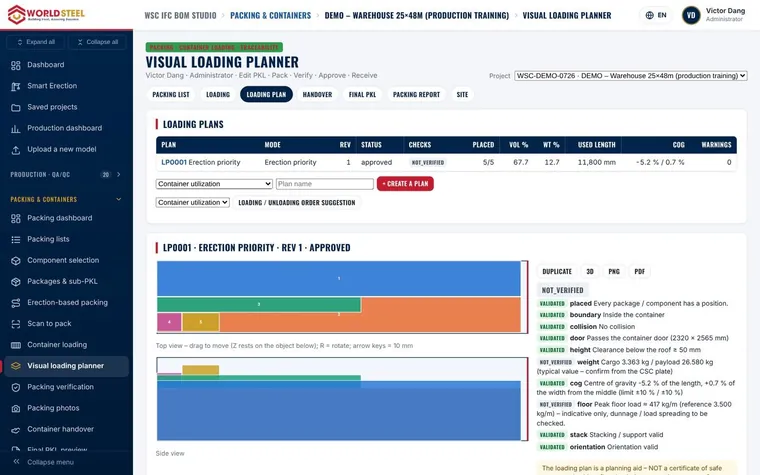
-
Step 4
Scan to pack
Packers use SCAN → CHECK → CONFIRM → SAVE. Wrong package, wrong container or ineligible components are flagged immediately.
-
Step 5
Inspect, weigh and seal
Record the 7-point container inspection, securing, VGM and seal numbers, and upload photos and videos of the loading.
-
Step 6
Release and send
The logistics manager releases the container. Send the report to your client through the QR code, a share link with expiry and PIN, or a client account.
Updated 01 Nov 2026